
 Kia Sedona: To set cruise control speed
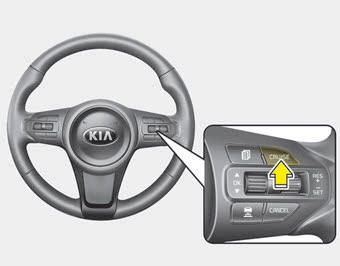
1.Press the CRUISE button, to turn the system on. The CRUISE indicator light in the instrument cluster will illuminate.
2. Accelerate to the desired speed.
- 30 km/h (20 mph) ~ 180 km/h (110 mph) : when there is no vehicle in front
- 10 km/h (5 mph) ~ 180 km/h (110 mph) : when there is a vehicle in front
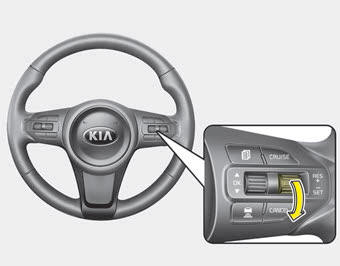
3.Lever must be moved down (to SET-) prior to setting any desired speed. The SET indicator light, set speed and vehicle to vehicle distance on the LCD screen will illuminate.
4.Release the accelerator pedal. The desired speed will automatically be maintained.
If there is a vehicle in front of you, the speed may decrease to maintain the distance to the vehicle ahead.
On a steep grade, the vehicle may slow down or speed up slightly while going uphill or downhill.

 To increase cruise control set speed
Follow either of these procedures:
Move the lever up (to RES+), and hold it. Your vehicle set speed will increase
by 10 km/h (5 mph). Release the lever at the speed you want.
Move the lever ...
Other Information:
Knock Sensor (KS) Repair procedures
Removal
[Bank 1]
1.
Turn the ignition switch OFF and disconnect the battery negative (-) terminal.
2.
Remove the intake manifold.
(Refer to Engine Mechanical System - "Intake Manifold")
...
Engine Room Under Cover Components and Components Location
Components
1. Engine room RH side cover2. Engine room LH side cover3. Engine room front under cover
...
Categories
- Home
- First Generation
- Second Generation
- Third generation
- Kia Sedona YP 2014-2026 Owners Manual
- Kia Sedona YP 2014-2026 Service Manual
