
 Kia Sedona: Leg support (2nd row seat for SXL package)
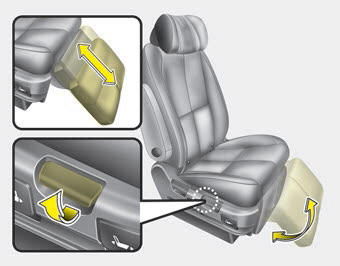
To use the leg support :
1. Pull the leg support lever up and hold it.
2. Adjust the angle and length of the leg support while holding the leg support. When using the leg rest, move the seat to the inner position, and then toward the back. If the seat is not moved far back, it may come in contact with the first row seat.
3. Release the lever and make sure the leg support is locked in place.
 Walk-out seat (2nd row seat for SXL package)
To get out from the 3rd row seat,
1. Lift the armrest up , lower the headrests to the lowest position and slide
the seat inside. (if necessary).
2. Pull the walk-in strap (1) on the 2nd row seat ...
 Folding the rear seat
The rear seatbacks can be folded to facilitate carrying long items or to increase
the luggage capacity of the vehicle.
WARNING - Folded down seatback
Never allow passengers sit on top of the f ...
Other Information:
Push-starting
Vehicles equipped with automatic transaxle lock system cannot be push-started.
Follow the directions in this section for jump-starting.
WARNING - Tow starting vehicle
Never tow a vehicle to sta ...
Muffler Components and Components Location
Components
1. Gasket2. Hanger3. Front muffler4. Catalytic converter & Center muffler assembly5. Rear muffler6. Tail muffler
...
Categories
- Home
- First Generation
- Second Generation
- Third generation
- Kia Sedona YP 2014-2026 Owners Manual
- Kia Sedona YP 2014-2026 Service Manual
