
 Kia Sedona: On curves
Third generation YP (2014-2026) / Kia Sedona YP Owners Manual / Driving your vehicle / Smart cruise control system (SCC) / Limitations of the system / On curves
- On curves, the SCC may not detect a moving vehicle in your lane, and then your vehicle could accelerate to the set speed. Also, the vehicle speed will rapidly slow down when the vehicle ahead is recognized suddenly.
- Select the appropriate set speed on curves and adjust your vehicle speed by depressing the accelerator or brake pedal according to the road condition ahead and driving condition.
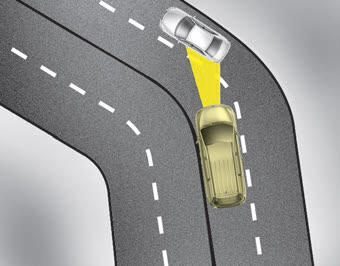
- Your vehicle speed can be reduced due to a vehicle in the adjacent lane. Adjust your vehicle speed by depressing the brake pedal according to the road condition ahead and driving condition. Apply the accelerator pedal and select the appropriate set speed. Check to be sure that the road conditions permit safe operation of the SCC.
 Limitations of the system
The SCC may have limits to its ability to detect distance to the vehicle ahead
due to road and traffic conditions. ...
 On inclines
During uphill or downhill driving, the SCC may not detect a moving vehicle
in your lane, and cause your vehicle to accelerate to the set speed. Also, the
vehicle speed will rapidly slow dow ...
Other Information:
Thermostat Components and Components Location
Components
1. Water temperature control assembly2. Thermostat3. Water inlet fitting pipe
...
STG Spindle Repair procedures
Removal
[LH]
1.
Disconnect the negative (-) battery terminal.
2.
Remove the tail gate trim [LH].
(Refer to Body - "Tail Gate Trim")
3.
Disconnect the STG spindle connector (A).
4.
Us ...
Categories
- Home
- First Generation
- Second Generation
- Third generation
- Kia Sedona YP 2014-2026 Owners Manual
- Kia Sedona YP 2014-2026 Service Manual

Copyright © www.kisedona.com 2016-2026