
 Kia Sedona: Rear fan speed control
From front seat
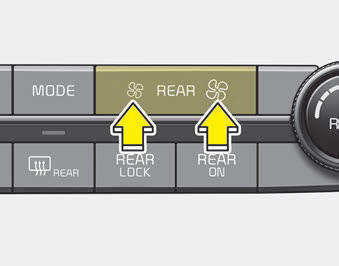
Set the rear climate control selection (REAR ON) button to the ON position and press the rear fan speed control button in the front climate control panel to the desired position.
To change the fan speed, press ( ) the
button for higher speed, or press the ()
the button for lower speed. To turn the fan speed control off, press the REAR ON
button.
) the
button for higher speed, or press the ()
the button for lower speed. To turn the fan speed control off, press the REAR ON
button.
From rear seat
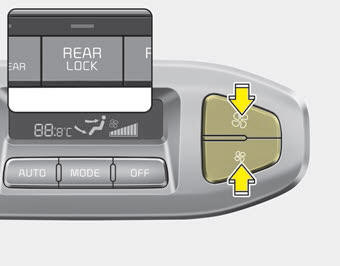
Set the rear climate control selection (REAR ON) button in the front climate control panel to the ON position and set the rear climate control selection(REAR LOCK) button in the front climate control panel to the OFF position and press the rear fan speed control button on the rear control panel to the desired position.
To change the fan speed, press () the
button for higher speed, or press the ()
the button for lower speed. To turn the fan speed control off, press the rear blower
OFF button.
 Rear climate control
To turn on the rear climate control system;
From the front seat
1. Set the rear climate control selection (REAR ON) button in the front climate
control panel to the ON position.
2. Set the rear f ...
 Rear temperature control
From front seat
Set the rear climate control selection (REAR ON) button to the ON position and
press the rear fan speed control button in the front climate control panel to the
desired position ...
Other Information:
Closing the hood
1. Before closing the hood, check the following:
All filler caps in the engine compartment must be correctly installed.
Gloves, rags or any other combustible material must be removed from the
...
Crankshaft Position Sensor (CKPS) Troubleshooting
Wave Form
...
Categories
- Home
- First Generation
- Second Generation
- Third generation
- Kia Sedona YP 2014-2026 Owners Manual
- Kia Sedona YP 2014-2026 Service Manual
