
 Kia Sedona: Lumbar support (for driver
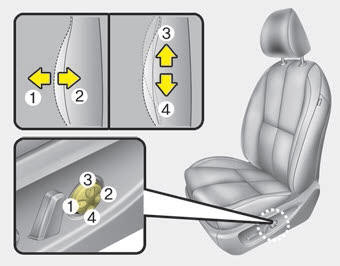
The lumbar support can be adjusted by pressing the lumbar support switch on the side of the drivers seat. Press the front portion of the switch (1) to increase support, or the rear portion of the switch (2) to decrease support. Move the support position up and down by pressing the switch (3) or (4).
 Seat height
Pull the front portion of the control switch up to raise or press down to lower
the front part of the seat cushion. Pull the rear portion of the control switch
up to raise or press down to lower ...
 Driver position memory system
A driver position memory system is provided to store and recall the driver seat
and outside rearview mirror position with a simple button operation. By saving the
desired position into the syste ...
Other Information:
Releasing the parking brake
To release the parking brake, depress the parking brake pedal a second time while
applying the foot brake. The pedal will automatically extend to the fully released
position.
WARNING - Park ...
Power Door Lock Actuators Repair procedures
Inspection
Special care is needed for the following points in case of working with the non-gloss timber trimming.
•
Wrap a protective tape around tools used ...
Categories
- Home
- First Generation
- Second Generation
- Third generation
- Kia Sedona YP 2014-2026 Owners Manual
- Kia Sedona YP 2014-2026 Service Manual
