
 Kia Sedona: Lumbar support (for driver
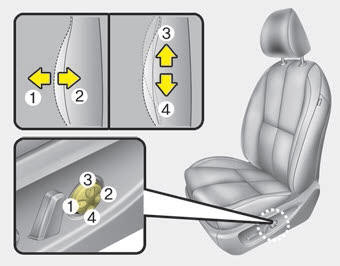
The lumbar support can be adjusted by pressing the lumbar support switch on the side of the drivers seat. Press the front portion of the switch (1) to increase support, or the rear portion of the switch (2) to decrease support. Move the support position up and down by pressing the switch (3) or (4).
 Seat height
Pull the front portion of the control switch up to raise or press down to lower
the front part of the seat cushion. Pull the rear portion of the control switch
up to raise or press down to lower ...
 Driver position memory system
A driver position memory system is provided to store and recall the driver seat
and outside rearview mirror position with a simple button operation. By saving the
desired position into the syste ...
Other Information:
Inner panel fuse replacement
1. Turn the ignition switch and all other switches off.
2. Open the fuse panel cover.
3. Pull the suspected fuse straight out. Use the removal tool provided on the
engine compartment fuse pane ...
To set cruise control speed
1.Press the CRUISE button, to turn the system on. The CRUISE indicator light
in the instrument cluster will illuminate.
2. Accelerate to the desired speed.
30 km/h (20 mph) ~ 180 km/h (110 mp ...
Categories
- Home
- First Generation
- Second Generation
- Third generation
- Kia Sedona YP 2014-2026 Owners Manual
- Kia Sedona YP 2014-2026 Service Manual
