
 Kia Sedona: Lumbar support
Third generation YP (2014-2026) / Kia Sedona YP Owners Manual / Safety features of your vehicle / Seats / Front seat adjustment - manual / Lumbar support
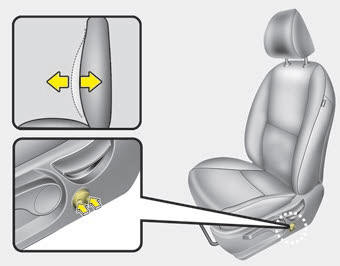
The lumbar support can be adjusted by pressing the lumbar support switch on the side of the seat.
1. Press the front portion of the switch to increase support, or the rear portion of the switch, to decrease support.
2. Release the switch once it reaches the desired position.
 Seat height (for driver
To change the height of the seat, push the lever upwards or downwards.
To lower the seat cushion, push the lever down several times.
To raise the seat cushion, pull the lever up several times. ...
 Front seat adjustment - power
The front seat can be adjusted by using the control switches located on the outside
of the seat cushion. Before driving, adjust the seat to the proper position so you
can easily control the steeri ...
Other Information:
Lumbar support (for driver
The lumbar support can be adjusted by pressing the lumbar support switch on the
side of the drivers seat. Press the front portion of the switch (1) to increase
support, or the rear portion of th ...
Smart Tailgate Unit Schematic Diagrams
Circuit Diagram
...
Categories
- Home
- First Generation
- Second Generation
- Third generation
- Kia Sedona YP 2014-2026 Owners Manual
- Kia Sedona YP 2014-2026 Service Manual

Copyright © www.kisedona.com 2016-2026