
 Kia Sedona: Battery replacement
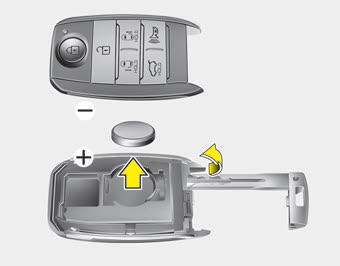
A smart key battery should last for several years, but if the smart key is not working properly, try replacing the battery with a new one. If you are unsure how to use your smart key or replace the battery, contact an authorized Kia dealer.
1. Remove the mechanical key.
2. Pry open the rear cover.
3. Replace the battery with a new battery (CR2032). When replacing the battery, make sure the battery position.
4. Install the battery in the reverse order of removal.
- The smart key is designed to give you years of trouble-free use, however it can malfunction if exposed to moisture or static electricity. If you are unsure how to use or replace the battery, contact an authorized Kia dealer.
- Using the wrong battery can cause the smart key to malfunction. Be sure to use the correct battery.
- To avoid damaging the smart key, don't drop it, get it wet, or expose it to heat or sunlight.

 Smart key precautions
The smart key will not work if any of the following occur :
- The smart key is close to a radio transmitter such as a radio station or an
airport which can interfere with normal operation of t ...
 Smart key immobilizer system
Your vehicle is equipped with an electronic engine immobilizer system to reduce
the risk of unauthorized vehicle use.
Your immobilizer system is comprised of a small transponder in the smart key
...
Other Information:
Cruise control system
The cruise control system allows you to program the vehicle to maintain a constant
speed without depressing the accelerator pedal.
This system is designed to function above approximately 40 km/h (2 ...
Heater & A/C Control Unit (Rear) Components and Components Location
Components (1)
[Standard]
Connector Pin Function
Connector Pin NoFunctionA1BATT2ILL+ (TAIL)3MODE ACT''R F/B - REAR4MODE ACT''R (VENT) - REAR5MODE ACT''R (FLOOR) - REAR6TEMP ACT''R F/B - ...
Categories
- Home
- First Generation
- Second Generation
- Third generation
- Kia Sedona YP 2014-2026 Owners Manual
- Kia Sedona YP 2014-2026 Service Manual
