
 Kia Sedona: Erasing programmed HomeLink buttons
Third generation YP (2014-2026) / Kia Sedona YP Owners Manual / Features of your vehicle / Mirrors / Erasing programmed HomeLink buttons
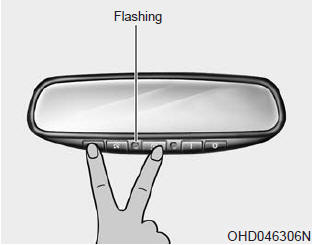
To erase the three programmed buttons (individual buttons cannot be erased) :
 Operating HomeLink
To operate, simply press the programmed HomeLink button. Activation will now
occur for the trained product (garage door, security system, entry door lock, estate
gate, or home or office lighting). ...
 Reprogramming a single HomeLink button
To program a device to HomeLink using a HomeLink button previously trained, follow
these steps:
1. Press and hold the desired HomeLink button. Do NOT release until step 4 has
been completed.
2. ...
Other Information:
Floor Console Assembly Repair procedures
Replacement
Put on gloves to protect your hands.
•
When prying with a flat-tip screwdriver, wrap it with
protective tape, an ...
General Information
Identification Numbers
Identification Number Description
Vehicle Identification Number
1.
World Manufacturer Identifier (WMI)
- KNA : Passenger vehicle, MPV(Multipurpose Passenger Vehicle)/SUV( ...
Categories
- Home
- First Generation
- Second Generation
- Third generation
- Kia Sedona YP 2014-2026 Owners Manual
- Kia Sedona YP 2014-2026 Service Manual

Copyright © www.kisedona.com 2016-2026