
 Kia Sedona: AVN keyboard Repair procedures
Third generation YP (2014-2026) / Kia Sedona YP Service Manual / Body Electrical System / AVN System / AVN keyboard Repair procedures
| Removal |
| 1. |
Disconnect the negative (-) battery terminal. |
| 2. |
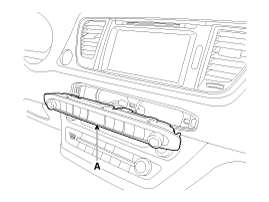
Using a screwdriver or remover, remove the AVN keyboard unit (A).
|
| 3. |
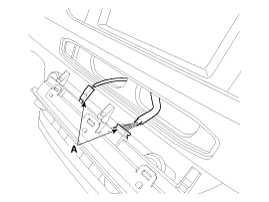
Disconnect the AVN keyboard unit connector (A).
|
| Installation |
| 1. |
Connect the AVN keyboard unit connector. |
| 2. |
Install the AVN keyboard unit. |
| 3. |
Connect the negative (-) battery terminal.
|

 AVN keyboard Components and Components Location
Components
...
 External AMP Components and Components Location
Components
Connector Pin Information
No.Connector ANo.Connector B1Left front door (+)1Center front (+)2Right front door (+)2-3Left side door (+)3-4Right side door (+)4-5Subwoofer 2 (+)5Navi (+)6 ...
Other Information:
Temperature Control Actuator Description and Operation
Description
The heater unit includes mode control actuator and temperature control actuator.
Located in the heater unit, the temperature control actuator regulates the temperature in the following ...
Driving off-road
Drive carefully off-road because your vehicle may be damaged by rocks or roots
of trees. Become familiar with the off-road conditions where you are going to drive
before you begin driving. ...
Categories
- Home
- First Generation
- Second Generation
- Third generation
- Kia Sedona YP 2014-2026 Owners Manual
- Kia Sedona YP 2014-2026 Service Manual

Copyright © www.kisedona.com 2016-2026