
 Kia Sedona: Rear Wiper Motor Repair procedures
Third generation YP (2014-2026) / Kia Sedona YP Service Manual / Body Electrical System / Rear Wiper/Washer / Rear Wiper Motor Repair procedures
| Removal |
Set up to automatically operate wipers of rear window glass
when reverse gear shift is engaged while the wipers of windshield glass
are in operation in ''Instrument Panel - User Setting Menu (USM). |

| 1. |
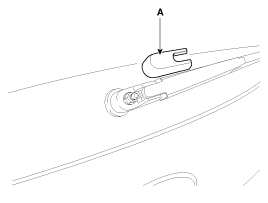
Detach the rear wiper cap (A).
|
| 2. |
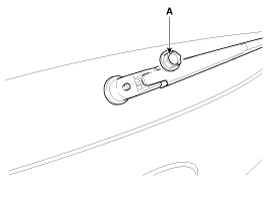
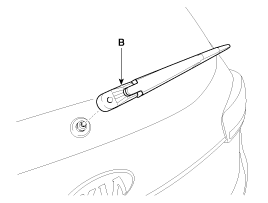
Remove the rear wiper arm & blade (A) after removing rear wiper HEX nut (B).
|
| 3. |
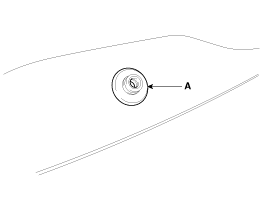
Remove the rear wiper cap & pad (A).
|
| 4. |
Remove the tailgate trim after opening the tailgate.
(Refer to Body - "Tailgate Trim") |
| 5. |
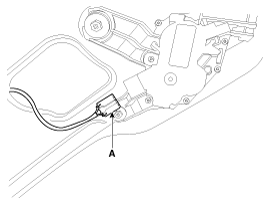
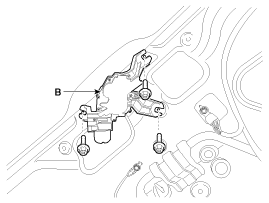
Disconnect the rear wiper motor connector (A) and then remove the rear wiper motor (B) after loosening bolts.
|
| Installation |
| 1. |
Install the rear wiper motor assembly.
|
| 2. |
Install the tailgate trim. |
| 3. |
Install the rear wiper arm cap after tightening the nut.
|
| 4. |
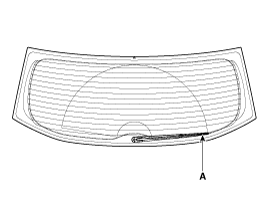
Set the rear wiper blade and to the lowest defogger heat line and tailgate glass.
|
| Inspection |
Rear Wiper Motor
| 1. |
Remove the connector from the rear wiper motor. |
| 2. |
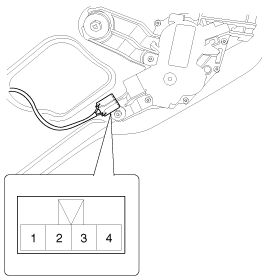
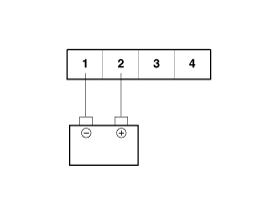
Connect battery positive (+) and negative (-) cables to terminals 2 and 1 respectively. |
| 3. |
Check that the motor operates normally. Replace the motor if it operates abnormally.
|
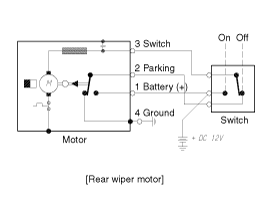
Automatic Stop Operation Check
| 1. |
Operate the motor at low speed using the stalk control. |
| 2. |
Stop the motor operation anywhere except at the off position by disconnecting terminal 2. |
| 3. |
Connect the positive (+) lead from the battery to terminal 2 and the negative (-) lead to terminal 1. |
| 4. |
Check that the motor stops running at the off position.
|
 Components and Components Location
Component Location
1. Head cap2. Rear wiper arm nut3. Rear wiper arm & blade4. Cap & pad assembly5. Rear wiper motor assembly6.Rear wiper motor bolt
...
 Rear Washer Switch Repair procedures
Inspection
1.
Check for continuity between the terminals while operating
the wiper and washer switch. If it is not in normal condition, replace
wiper and wiper switch.
Rear Wiper Switch
Rear ...
Other Information:
Components and Components Location
Components
1. Bezel2. Steering wheel3. Remote control assembly4. Wiring5. Lower cover6. Multifunction switch
...
Tire terminology and definitions
Air Pressure: The amount of air inside the tire pressing outward on the tire.
Air pressure is expressed in pounds per square inch (psi) or kilopascal (kPa).
Accessory Weight: This means the combine ...
Categories
- Home
- First Generation
- Second Generation
- Third generation
- Kia Sedona YP 2014-2026 Owners Manual
- Kia Sedona YP 2014-2026 Service Manual

Copyright © www.kisedona.com 2016-2026