
 Kia Sedona: Operating conditions
Third generation YP (2014-2026) / Kia Sedona YP Owners Manual / Driving your vehicle / Blind spot detection system (BSD) / RCTA (Rear Cross Traffic Alert) / Operating conditions
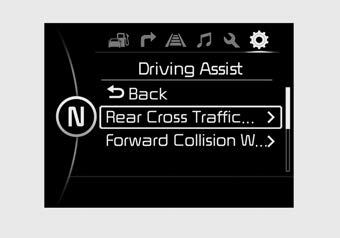
Type B
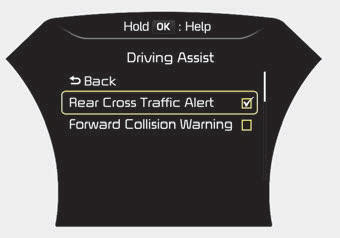
Type C
- Select RCTA (Rear Cross Traffic Alert) in "User Settings" under "Driving Assist" on the instrument cluster. The system will turn on and standby to activate.
- Select RCTA again, to turn the system off.
- If the vehicle is turned off and on again, the RCTA system will return to the state right before the vehicle was turned off. Always turn the RCTA system off when not in use.
- The system operates when the vehicle speed is below 10 km/h (6.2 mph) with the shift lever in R (Reverse).
- The RCTA (Rear Cross Traffic Alert) detecting range is 0.5m ~ 20m based on the side direction. If the approaching vehicle speed is 4 km/h (2.5 mph) ~ 36 km/h (22 mph) within sensing range, it is detected. However, the system sensing range is different base on conditions. Always pay attention to the surrounding.
 RCTA (Rear Cross Traffic Alert)
When your vehicle moves backwards from a parking position, the sensor detects
approaching vehicles to the left or right side direction and gives information to
the driver. ...
 Warning type
If the vehicle detected by sensors approaches your vehicle, the warning
chime will sound and the warning light will blink on the outside rearview mirror.
If the detected vehicle is out of th ...
Other Information:
Front Hub / Knuckle / Tone Wheel Repair procedures
Removal
1.
Remove the front wheel and tire (A) from front hub.
Tightening torque:
88.2 ~ 107.8 N.m (9.0 ~ 11.0 kgf.m, 65.0 ~ 79.5 lb-ft)
Be careful not to damag ...
Antenna Coil Repair procedures
Removal
1.
Disconnect the negative (-) battery terminal.
2.
Remove the crash pad lower panel.
(Refer to Body - "Crash Pad Lower Panel")
3.
Disconnect the 6P connector (B) of the coil ante ...
Categories
- Home
- First Generation
- Second Generation
- Third generation
- Kia Sedona YP 2014-2026 Owners Manual
- Kia Sedona YP 2014-2026 Service Manual

Copyright © www.kisedona.com 2016-2026