
 Kia Sedona: AVN (Audio Video Navigation) head unit Repair procedures
Third generation YP (2014-2026) / Kia Sedona YP Service Manual / Body Electrical System / AVN System / AVN (Audio Video Navigation) head unit Repair procedures
| Removal |
|

| 1. |
Disconnect the negative (-) battery terminal. |
| 2. |
Remove the center fascia upper panel.
(Refer to Body - "Center Fascia Panel") |
| 3. |
Remove the AVN head unit (A) after loosening the mounting screws.
|
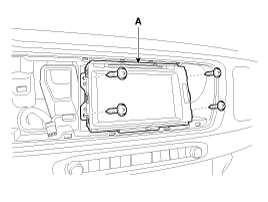
| 4. |
Disconnect the connectors (A) from the AVN head unit.
|
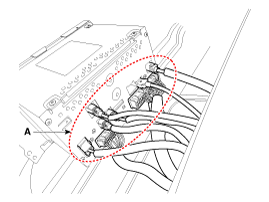
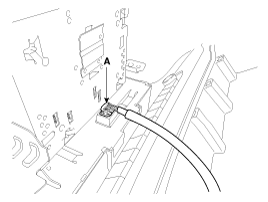
| Installation |
| 1. |
Connect the AVN head unit connectors. |
| 2. |
Install the AVN head unit. |
| 3. |
Install the center fascia upper panel. |
| 4. |
Connect the negative (-) battery terminal.
|
 AVN (Audio Video Navigation) head unit Components and Components Location
Components
Connector Pin Information
Connector Pin Information
No.Connector AConnector BConnector CConnector D1-MM CAN (+)Chassis CAN (-)GND2--Chassis CAN (+)GND3-- (Parking)--4---GND5M GND (SP ...
 AVN keyboard Components and Components Location
Components
...
Other Information:
Fluid Repair procedures
Inspection
Automatic Transaxle Fluid (ATF) Level Check
When checking the ATF level, be careful not to allow foreign substance (like dust) to enter through the filler ...
Rear Seat Belt Buckle Repair procedures
Replacement
[Second row seat belt buckle]
1.
Using a screwdriver or remover, remove the leg outer cover (A).
2.
Remove the second row seat belt buckle (A) after loosening the bolt.
3.
I ...
Categories
- Home
- First Generation
- Second Generation
- Third generation
- Kia Sedona YP 2014-2026 Owners Manual
- Kia Sedona YP 2014-2026 Service Manual

Copyright © www.kisedona.com 2016-2026