
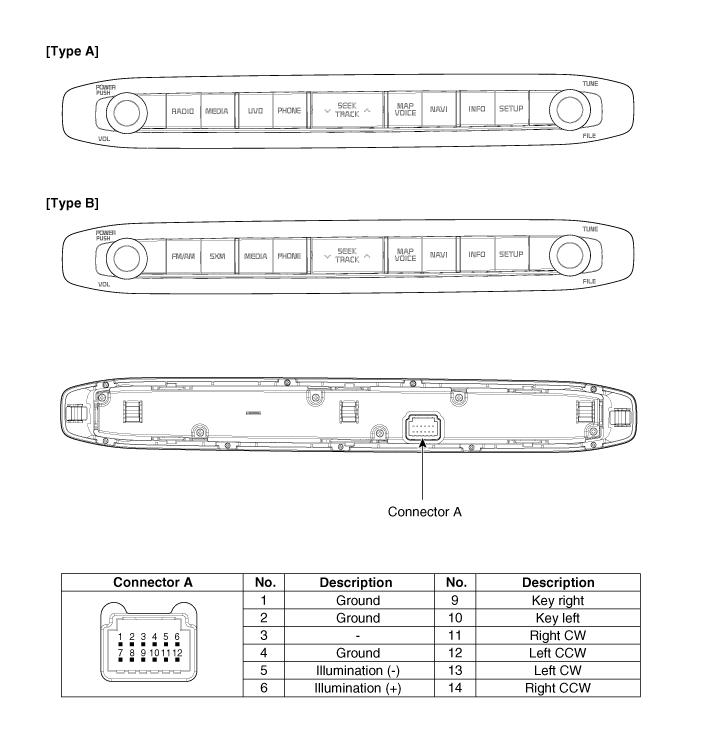
 Kia Sedona: AVN keyboard Components and Components Location
Third generation YP (2014-2026) / Kia Sedona YP Service Manual / Body Electrical System / AVN System / AVN keyboard Components and Components Location
| Components |
 AVN (Audio Video Navigation) head unit Repair procedures
Removal
•
Take care not to scratch the cluster fascia panel and related parts.
•
Eject all the disc before removing the AVN head unit to prevent da ...
 AVN keyboard Repair procedures
Removal
1.
Disconnect the negative (-) battery terminal.
2.
Using a screwdriver or remover, remove the AVN keyboard unit (A).
3.
Disconnect the AVN keyboard unit connector (A).
Installati ...
Other Information:
Crankshaft Damper Pulley Repair procedures
Removal and Installation
1.
Remove the engine room under cover and engine room RH side cover.
(Refer to Engine And Transaxle Assembly - "Engine Room Under Cover")
2.
Remove the RH side front ...
Maintenance when trailer towing
Your vehicle will need service more often when you regularly pull a trailer.
Important items to pay particular attention to include engine oil, automatic transaxle
fluid, axle lubricant and coolin ...
Categories
- Home
- First Generation
- Second Generation
- Third generation
- Kia Sedona YP 2014-2026 Owners Manual
- Kia Sedona YP 2014-2026 Service Manual

Copyright © www.kisedona.com 2016-2026