
 Kia Sedona: Condenser Repair procedures
Third generation YP (2014-2026) / Kia Sedona YP Service Manual / Heating,Ventilation And Air Conditioning / Air conditioning System / Condenser Repair procedures
| Inspection |
| 1. |
Check the condenser fins for clogging and damage. If clogged,
clean them with water, and blow them with compressed air. If bent,
gently bend them using a screwdriver or pliers. |
| 2. |
Check the condenser connections for leakage, and repair or replace it, if required.
|
| Replacement |
| 1. |
Recover the refrigerant with a recovery/recycling/charging station. |
| 2. |
Disconnect the negative (-) battery terminal. |
| 3. |
Remove the front bumper.
(Refer to Body - "Front Bumper Cover") |
| 4. |
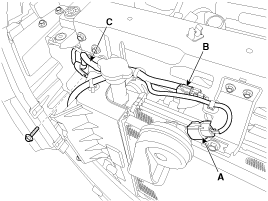
Disconnect the horn connector (A). |
| 5. |
Disconnect the hood latch connector (B). |
| 6. |
Disconnect the over flow hose (C).
|
| 7. |
Remove the cooling fan assembly.
(Refer to Cooling System - "Cooling Fan") |
| 8. |
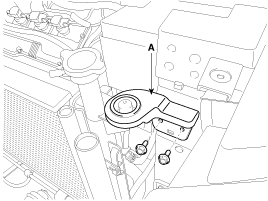
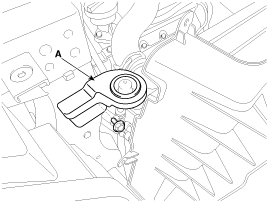
Remove the radiator upper bracket (A).
[LH]
[RH]
|
| 9. |
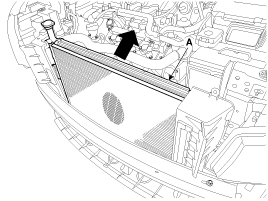
Separate the radiator assembly (A) to obtain space for remove the air guard.
|
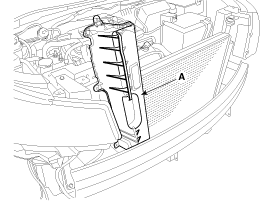
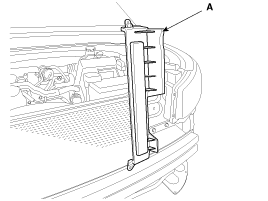
| 10. |
Remove the air guard (A).
[LH]
[RH]
|
| 11. |
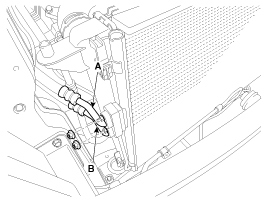
Remove the 2 nuts, and then disconnect the discharge line (A) and liquid line (B) from the condenser.
|
| 12. |
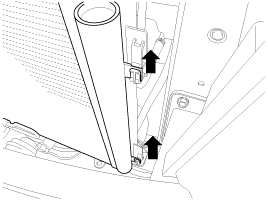
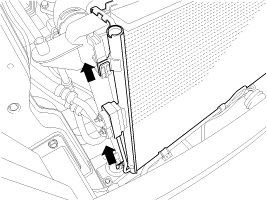
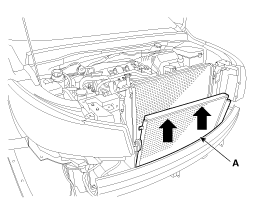
Remove the condenser (A) from the radiator.
[LH]
[RH]
|
| 13. |
Install in the reverse order of removal.
|

 Condenser Components and Components Location
Components
1. Condenser
...
 Receiver-Drier Repair procedures
Replacement
1.
Remove the condenser.
2.
Remove the cap (B) on the bottom of the condenser with an L wrench (A).
Tightening torque :
9.8 ~ 14.7 N.m (1.0 ~ 1.5 kgf.m, 7.2 ~ 10.8 lb-ft)
...
Other Information:
Glove box
The glove box can be locked and unlocked with a master key. (if equipped)
To open the glove box, pull the handle and the glove box will automatically open.
Close the glove box after use.
WAR ...
Schematic Diagrams
Circuit Diagram
Connector Pin Information
No.Motor ConnectorSunroof Wiring Connector1Battery 1GND 12Open alarmRear lock switch3GND 1IGN4Rear lock switchSignal C5-Signal A6Signal CBattery 17Signa ...
Categories
- Home
- First Generation
- Second Generation
- Third generation
- Kia Sedona YP 2014-2026 Owners Manual
- Kia Sedona YP 2014-2026 Service Manual

Copyright © www.kisedona.com 2016-2026