
 Kia Sedona: Brake Pedal Repair procedures
Third generation YP (2014-2026) / Kia Sedona YP Service Manual / Brake System / Brake System / Brake Pedal Repair procedures
| Removal |
| 1. |
Turn ignition switch OFF and disconnect the negative (-) battery cable. |
| 2. |
Remove the crash pad lower panel and reinforcing panel. (Refer to the Body group- crash pad). |
| 3. |
Remove the shower duct (A).
|
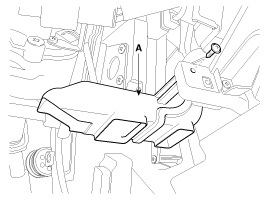
| 4. |
Pull down steering column shaft after removing bolts and nuts. (Refer to the steering group - Steering columm & shaft) |
| 5. |
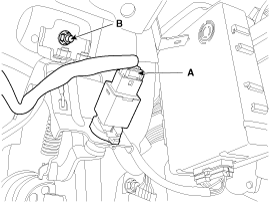
Disconnect the brake switch connector (A).
|
| 6. |
Remove the brake pedal member mounting nut (B). |
| 7. |
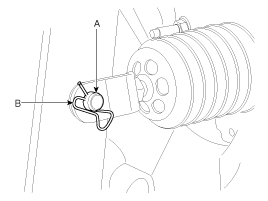
Remove the snap pin (A) and clevis pin (B).
|
| 8. |
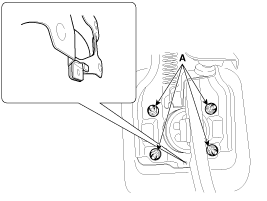
Remove the brake pedal member assembly mounting nuts (A) and then remove the brake pedal assembly.
|

| Inspection |
| 1. |
Check the bushing for wear. |
| 2. |
Check the brake pedal for bending or twisting. |
| 3. |
Check the brake pedal return spring for damage. |
| Installation |
| 1. |
Install the brake pedal assembly in dash panel.
|
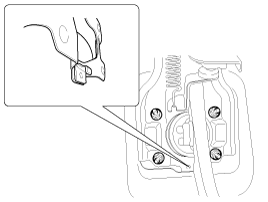
| 2. |
Pre-tighten the bracket fixing bolt(B) in dash panel.
|
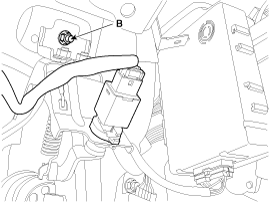
| 3. |
Install the brake booster and brake pedal member fixing nut (A) securely.
|
| 4. |
Tighten the bolt (B) securely in dash panel.
|
| 5. |
Install the snap pin (A) and clevis pin (B).
|

| 6. |
Install the brake switch securely. |
| 7. |
Connect the brake switch connector (A).
|
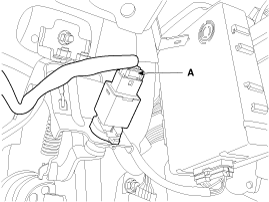
| 8. |
Adjust the brake pedal height and free play. |
| 9. |
Check the brake pedal operation after installing the brake pedal. |
| 10. |
Install the steering column shaft assembly. |
| 11. |
Install the shower duct (A).
|
| 12. |
Install the reinforcing panel and crash pad lower panel. |
| 13. |
Reconnect the battery negative cable. |
 Brake Pedal Components and Components Location
Components
1. Cowl bracket2. Brake pedal member assembly3. Brake switch4. Return spring5. Brake pedal stopper6. Clevis pin7. Snap pin8. Brake pedal
...
 Brake Switch Repair procedures
Removal
1.
Disconnect the brake switch connector (A).
2.
Pull the locking plate (A) as indicated by the arrow.
3.
Turn brake switch 45° counterclockwise and remove it.
Inspection
1.
...
Other Information:
Push-starting
Vehicles equipped with automatic transaxle lock system cannot be push-started.
Follow the directions in this section for jump-starting.
WARNING - Tow starting vehicle
Never tow a vehicle to sta ...
Roof Trim Assembly Components and Components Location
Component Location
1. Roof Trim Assembly
...
Categories
- Home
- First Generation
- Second Generation
- Third generation
- Kia Sedona YP 2014-2026 Owners Manual
- Kia Sedona YP 2014-2026 Service Manual

Copyright © www.kisedona.com 2016-2026