
 Kia Sedona: Surround View Monitoring Unit Repair procedures
Third generation YP (2014-2026) / Kia Sedona YP Service Manual / Body Electrical System / Surround View Monitoring (SVM) System / Surround View Monitoring Unit Repair procedures
| Removal |
| 1. |
Disconnect the negative (-) battery terminal. |
| 2. |
Remove the instrument cluster.
(Refer to Indicators And Gauges - "Instrument Cluster") |
| 3. |
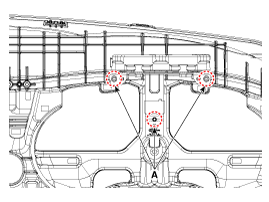
Loosen the mounting screws from backward of the main crash pad.
|
| 4. |
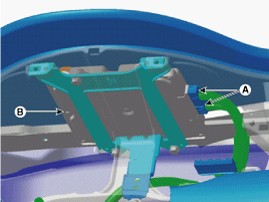
Remove the SVM unit (B) after disconnecting the connector (A).
|
| Installation |
| 1. |
Install the SVM unit and connector. |
| 2. |
Install the instrument cluster. |
| 3. |
Connect the negative (-) battery terminal. |

 Pantoscopic Camera Components and Components Location
Components
...
Other Information:
CVVT (Continuous Variable Valve Timing) System Description and Operation
Description
Continuous Variable Valve Timing (CVVT) system advances or
retards the valve timing of the intake and exhaust valve in accordance
with the ECM control signal which is calculated by ...
Description and Operation
Description
Automatic transaxle control system relies on various
measurement data to determine the current control status and determine
the necessary compensation values. These values are used ...
Categories
- Home
- First Generation
- Second Generation
- Third generation
- Kia Sedona YP 2014-2026 Owners Manual
- Kia Sedona YP 2014-2026 Service Manual

Copyright © www.kisedona.com 2016-2026