
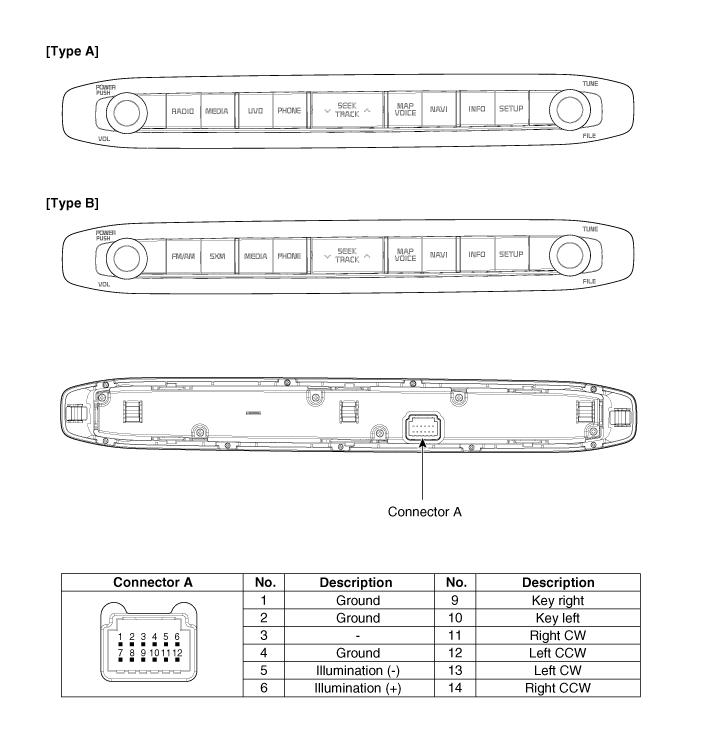
 Kia Sedona: AVN keyboard Components and Components Location
Third generation YP (2014-2026) / Kia Sedona YP Service Manual / Body Electrical System / AVN System / AVN keyboard Components and Components Location
| Components |
 AVN (Audio Video Navigation) head unit Repair procedures
Removal
•
Take care not to scratch the cluster fascia panel and related parts.
•
Eject all the disc before removing the AVN head unit to prevent da ...
 AVN keyboard Repair procedures
Removal
1.
Disconnect the negative (-) battery terminal.
2.
Using a screwdriver or remover, remove the AVN keyboard unit (A).
3.
Disconnect the AVN keyboard unit connector (A).
Installati ...
Other Information:
Seatback angle
2nd row seat
2nd row center seat
2nd row seat for SXL package
3rd row seat
To recline the seatback :
1. Pull up the seatback recline lever (for 2nd row outboard seat) or strap (for
2nd ...
Rear Hub - Carrier Components and Components Location
Components
1. Rear carrier assembly2. Parking brake assembly3. Rear hub assembly4. Rear brake disc
...
Categories
- Home
- First Generation
- Second Generation
- Third generation
- Kia Sedona YP 2014-2026 Owners Manual
- Kia Sedona YP 2014-2026 Service Manual

Copyright © www.kisedona.com 2016-2026