
 Kia Sedona: Repair procedures
Third generation YP (2014-2026) / Kia Sedona YP Service Manual / Body Electrical System / Ignition Switch Assembly / Repair procedures
| Inspection |
| 1. |
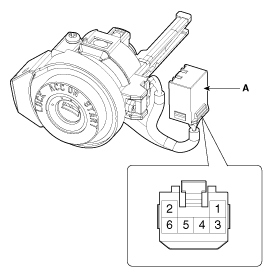
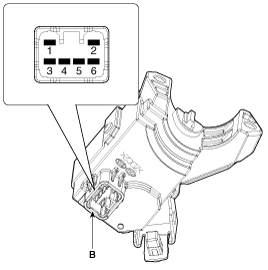
Disconnect the ignition switch connector (B) and key warning switch connector (A) from under the steering column.
|
| 2. |
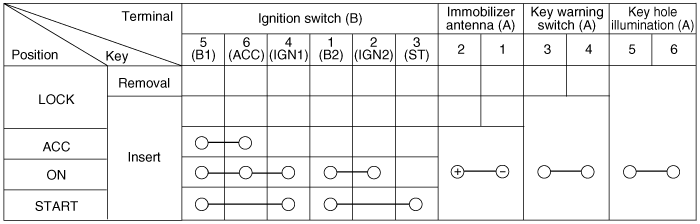
Check for continuity between the terminals. |
| 3. |
If continuity is not as specified, replace the switch. |
| Removal |
| 1. |
Disconnect the negative (-) battery terminal. |
| 2. |
Remove the crash pad lower panel.
(Refer to Body - "Crash Pad Lower Panel") |
| 3. |
Remove the steering column upper and lower shrouds.
(Refer to Body - "Steering Column Shroud Panel") |
| 4. |
Remove the wiper switch.
(Refer to "Multifunction switch") |
| 5. |
Remove the ignition switch after disconnecting the ignition switch 6P connector. |
| 6. |
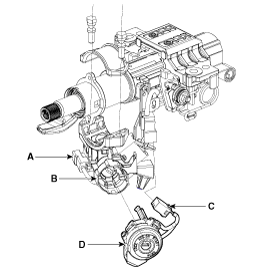
Remove the key warning/immobilizer connector (A). |
| 7. |
After loosening the screw, remove the key warning switch and key Illumination (B). |
| 8. |
If the key lock cylinder (C) needs to be removed, remove the
key lock cylinder while pushing the removal/installation button under
the key cylinder after turning the key to ACC.
|
| Installation |
| 1. |
Install the key lock cylinder. |
| 2. |
Install the key warning and immobilizer connector. |
| 3. |
Install the ignition switch. |
| 4. |
Install the steering column shrouds and crash pad lower panel. |


Other Information:
Special Service Tools
Special Service Tools
Tool Name / NumberIllustrationDescription09964-C1100SCC reflectorReflector to align the SCC radar09964-C1200Vertical / horizontal laserLaser to detect the center of the vehi ...
Surround View Monitoring Unit Repair procedures
Removal
1.
Disconnect the negative (-) battery terminal.
2.
Remove the instrument cluster.
(Refer to Indicators And Gauges - "Instrument Cluster")
3.
Loosen the mounting screws from backw ...
Categories
- Home
- First Generation
- Second Generation
- Third generation
- Kia Sedona YP 2014-2026 Owners Manual
- Kia Sedona YP 2014-2026 Service Manual

Copyright © www.kisedona.com 2016-2026