
 Kia Sedona: AUX jack Repair procedures
Third generation YP (2014-2026) / Kia Sedona YP Service Manual / Body Electrical System / AVN System / AUX jack Repair procedures
| Removal |
Multimedia Jack
| 1. |
Disconnect the negative (-) battery terminal. |
| 2. |
Remove the console upper cover (A).
(Refer to Body - "Floor Console Assembly")
|
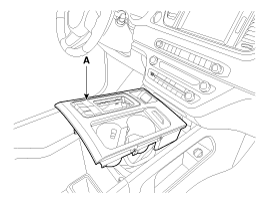
| 3. |
Disconnect the multimedia jack connector (A) and multi switch connector (B).
|
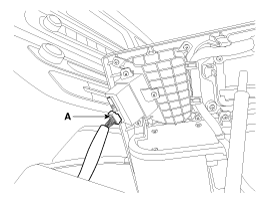
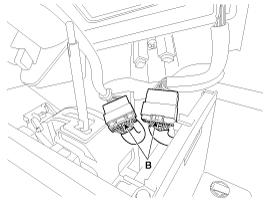
| 4. |
Remove the multimedia jack (A) after releasing the fixed hooks.
|
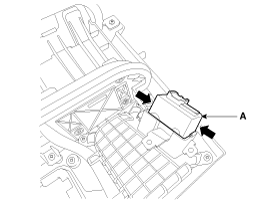
USB Charger (Front Seat)
| 1. |
Disconnect the negative (-) battery terminal. |
| 2. |
Remove the rear console assembly.
(Refer to Body - "Floor Console Assembly") |
| 3. |
Disconnect the USB charger connector (A).
|
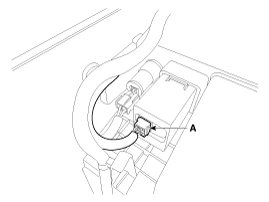
| 4. |
Remove the USB charger (A) after releasing the fixed hooks.
|
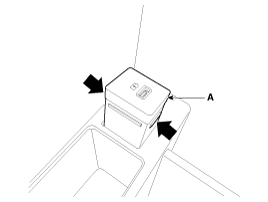
USB Charger (Rear Seat)
| 1. |
Disconnect the negative (-) battery terminal. |
| 2. |
Remove the rear console cover.
(Refer to Body - "Rear Console Cover") |
| 3. |
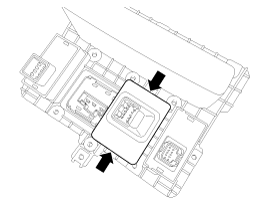
Remove the floor console tray (A) after loosening the screws.
|
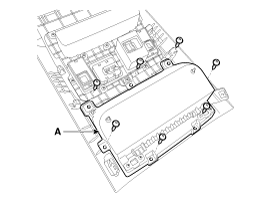
| 4. |
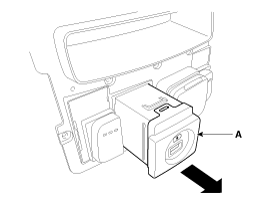
Remove the rear console switch panel (A) after loosening the screws.
|
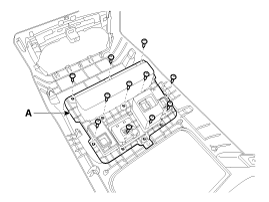
| 5. |
Remove the usb charger (A) after releasing the fixed hooks.
|
| Installation |
Multimedia Jack
| 1. |
Install the multimedia jcak. |
| 2. |
Connect the console upper cover connector. |
| 3. |
Install the console upper cover. |
| 4. |
Connect the negative (-) battery terminal. |
USB Charger (Front Seat)
| 1. |
Install the USB charger. |
| 2. |
Connect the USB charger connector. |
| 3. |
Install the rear console assembly. |
| 4. |
Connect the negative (-) battery terminal. |
USB Charger (Rear Seat)
| 1. |
Install the USB charger. |
| 2. |
Install the rear console switch panel. |
| 3. |
Install the floor console tray. |
| 4. |
Connect the USB charger connector. |
| 5. |
Install the rear console cover. |
| 6. |
Connect the negative (-) battery terminal. |
 AUX jack Description and Operation
Description
Using the added option of multimedia jack on the console
upper cover, users can link their external portable music players such
as MP3 and iPod to the vehicle''s sound system via th ...

Other Information:
Parking Assist Sensor Repair procedures
Removal
Front/Rear PAS Sensor
1.
Disconnect the negative (-) battery terminal.
2.
Remove the front/rear bumper cover.
(Refer to Body - "Front Bumper Cover")
(Refer to Body - "Rear Bumper Co ...
Driver's Attention
The driver must be cautious in the below situations for the system may not assist
the driver and may not work properly.
- Curved roads, tollgates, etc.
- The surrounding of the sensor is polluted ...
Categories
- Home
- First Generation
- Second Generation
- Third generation
- Kia Sedona YP 2014-2026 Owners Manual
- Kia Sedona YP 2014-2026 Service Manual

Copyright © www.kisedona.com 2016-2026