
 Kia Sedona: Shift Lever Repair procedures
Third generation YP (2014-2026) / Kia Sedona YP Service Manual / Automatic Transaxle System / Automatic Transaxle Control System / Shift Lever Repair procedures
| Removal |
| 1. |
Move the shift lever to "N" range. |
| 2. |
Disconnect the battery negative (-) cable. |
| 3. |
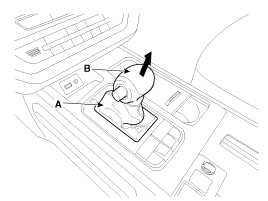
Remove the knob (A) and boots (B) by pulling them in the
direction of the arrow after separating the boots from the console upper
cover.
|
| 4. |
Remove the floor console assembly.
(Refer to Body - "Console") |
| 5. |
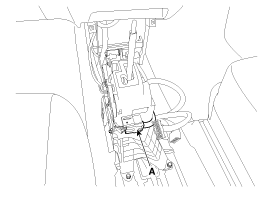
Disconnect the main connector (A).
|
| 6. |
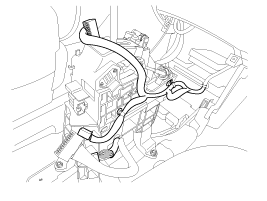
Disconnect the wiring from the shift lever.
|
| 7. |
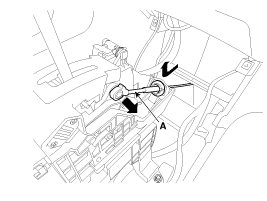
Remove the shift cable (A) from the shift lever.
|
| 8. |
Remove the shift lever assembly (A).
|
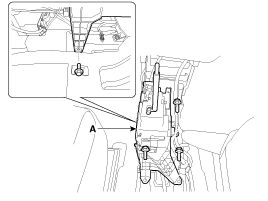
| Installation |
| 1. |
Install in the reverse order of removal. |
|

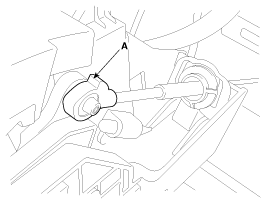
| Disassembly |
Key interlock switch
| 1. |
Remove the key interlock switch (A) after loosening the screw.
|
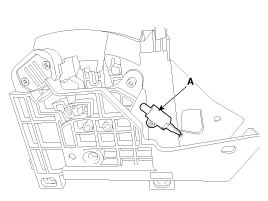
| 2. |
Remove the shift lock solenoid (B) after removing the plastic bracket (A).
|
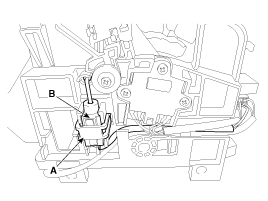
| 3. |
Remove the manual mode switch housing (A) after loosening the screw.
|
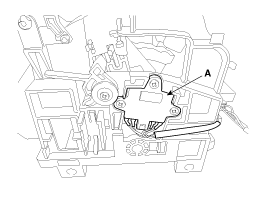
| 4. |
Remove the main connector (A) from the shift lever.
|
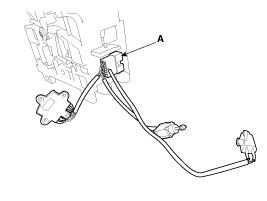
| 5. |
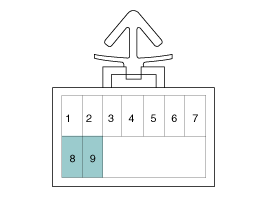
Remove the pin fixing bracket (A) from the main connector.
|
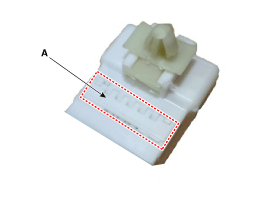
| 6. |
Remove the pin of key interlock switch from the main connector.
|
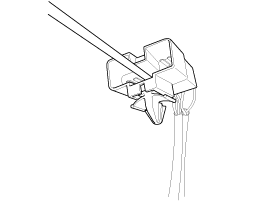
Shift lock solenoid
| 1. |
Remove the key interlock switch (A) after loosening the screw.
|
| 2. |
Remove the shift lock solenoid (B) after removing the plastic bracket (A).
|
| 3. |
Remove the manual mod switch housing (A) after loosening the screw.
|
| 4. |
Remove the main connector (A) from the shift lever.
|
| 5. |
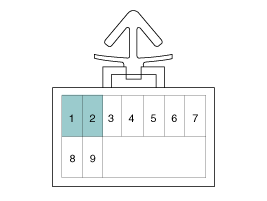
Remove the pin fixing bracket (A) from the main connector.
|
| 6. |
Remove the pin of shift lock solenoid from the main connector.
|
Manual mode switch housing
| 1. |
Remove the key interlock switch (A) after loosening the screw.
|
| 2. |
Remove the shift lock solenoid (B) after removing the plastic bracket (A).
|
| 3. |
Remove the manual mod switch housing (A) after loosening the screw.
|
| 4. |
Remove the main connector (A) from the shift lever.
|
| 5. |
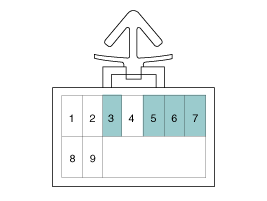
Remove the pin fixing bracket (A) from the main connector.
|
| 6. |
Remove the pin of manual mode switch housing from the main connector.
|
 Shift Lever Components and Components Location
Components
1. Shift lever2. Shift lever bracket3. Main shaft4. Manual mode switch housing5. Shift lock solenoid6. Key interlock switch7. Main connector8. Shift cable assembly9. Shift cable retain ...
 Shift Cable Components and Components Location
Components
1. Shift lever assembly2. Shift cable assembly3. Shift cable retainer
...
Other Information:
Operating condition
This system activates when the parking assist button is pressed with the
Engine Start/Stop Button ON.
The parking assist button turns on automatically and activates the parking
assist sys ...
General Information
General Service Information
Protection Of The Vehicle
Always be sure to cover fenders, seats, and floor areas before starting work.
The support rod must be inserted i ...
Categories
- Home
- First Generation
- Second Generation
- Third generation
- Kia Sedona YP 2014-2026 Owners Manual
- Kia Sedona YP 2014-2026 Service Manual

Copyright © www.kisedona.com 2016-2026