
 Kia Sedona: Repair procedures
Third generation YP (2014-2026) / Kia Sedona YP Service Manual / Body Electrical System / Multifunction Switch / Repair procedures
| Removal |
| 1. |
Disconnect the negative (-) battery terminal. |
| 2. |
Remove the steering wheel.
(Refer to Steering System - "Steering Wheel") |
| 3. |
Remove the steering column upper and lower shrouds after loosening the screws.
(Refer to Body - "Steering Column Shroud Panal") |
| 4. |
Remove the clock spring.
(Refer to Restraint - "Driver Airbag (DAB) Module and Clock Spring") |
| 5. |
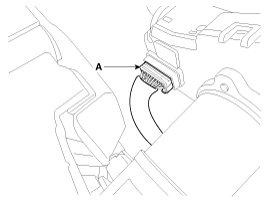
Disconnect the multifunction switch connector (A).
|
| 6. |
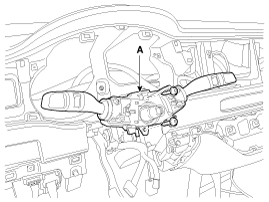
Remove the multifunction switch assembly (A) after loosening the screws.
|
| Installation |
| 1. |
Install the multifunction switch after connecting the connector. |
| 2. |
Install the clock spring. |
| 3. |
Install the steering column upper and lower shrouds. |
| 4. |
Install the steering wheel. |
| 5. |
Connect the negative (-) battery terminal. |
| Inspection |
Multifunction Switch Inspection
| 1. |
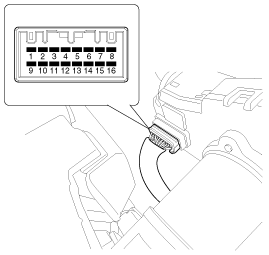
Check for continuity between the terminals in each switch position according to the table.
|
Inspection (With GDS)
| 1. |
The body electrical systems can quickly be diagnosed for failed parts using the available vehicle diagnostic systems (GDS).
The diagnostic systems (GDS) provide the following information.
|
| 2. |
Select the ''Car model'' and the system to be checked in order to check the vehicle with the tester. |
| 3. |
Select the ''Body Control Module (BCM)'' to check the multi function switch. |
| 4. |
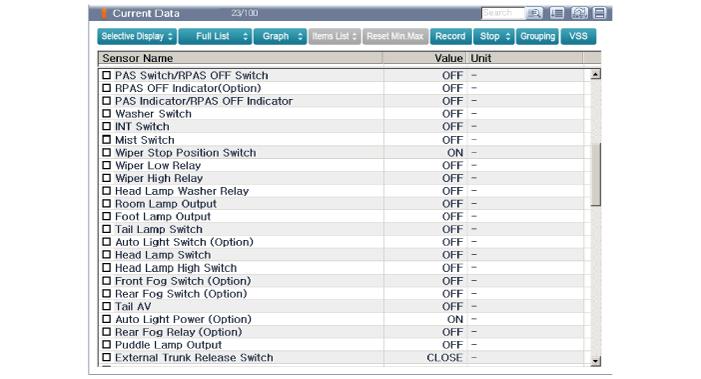
Select the ''Current data" menu to search the current state of the input/output data.
The input/output data for the sensors corresponding to the multi function switch can be checked.
|
 Components and Components Location
Component
1. Steering column2. Lighting switch3. Wiper switch4. Screw5. SAS6. Clock spring
...
 Schematic Diagrams
Schematic Diagram
...
Other Information:
Description and Operation
Description
System Overview
The System offers the following features:
–
Human / machine interface through a 1-stage button, for terminal switching and engine start.
–
Contro ...
Seatback pocket (for SXL package)
The seatback pocket is provided on the back of the 2nd row outboard seatbacks.
WARNING - Seatback pockets
Do not put heavy or sharp objects in the seatback pockets. In an accident
they could ...
Categories
- Home
- First Generation
- Second Generation
- Third generation
- Kia Sedona YP 2014-2026 Owners Manual
- Kia Sedona YP 2014-2026 Service Manual

Copyright © www.kisedona.com 2016-2026