
 Kia Sedona: Mode selection
Third generation YP (2014-2026) / Kia Sedona YP Owners Manual / Features of your vehicle / Automatic climate control system / Automatic heating and air conditioning / Mode selection
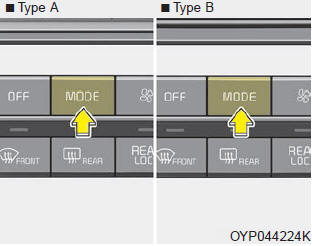
The mode selection button controls the direction of the air flow through the ventilation system.
The air flow outlet port is converted as follows:

Refer to the illustration in the
 Automatic heating and air conditioning
1. Press the AUTO button. The modes, fan speeds, air intake and air-conditioning
will be controlled automatically by setting the temperature.
2. Turn the temperature control knob to the desired ...
 Temperature control
The temperature will increase to the maximum (HI) by turning the knob to the
extreme right.
The temperature will decrease to the minimum (Lo) by turning the knob to the
extreme left.
When turn ...
Other Information:
Dynamic Damper Repair procedures
Removal
1.
Remove the front driveshaft.
(Refer to Driveshaft Assembly - “Front Driveshaft”)
2.
Remove the TJ joint assembly.
(Refer to Driveshaft Assembly - “TJ Joint”)
3.
Remo ...
Air bag Warning Light
This warning light illuminates:
Once you set the ignition switch or Engine Start/Stop Button to the ON position.
- It illuminates for approximately 6 seconds and then goes off.
When there is ...
Categories
- Home
- First Generation
- Second Generation
- Third generation
- Kia Sedona YP 2014-2026 Owners Manual
- Kia Sedona YP 2014-2026 Service Manual

Copyright © www.kisedona.com 2016-2026