
 Kia Sedona: Anti-Pinch Strip Repair procedures
Third generation YP (2014-2026) / Kia Sedona YP Service Manual / Body Electrical System / Power Sliding Door System / Anti-Pinch Strip Repair procedures
| Inspection |
| 1. |
Use the GDS to check input/output values in the Power Sliding
Door control module for each position. If there''s any malfunctioning,
replace the anti-pinch strip. |
| 2. |
To check the operation of the anti-pinch strip, choose “Power Sliding/Tailgate” and vehicle on the menu. |
| 3. |
Select "Power Sliding Door". |
| 4. |
After selecting sensor output value, operate the Power
Sliding Door in power mode and check for output value of anti-pinch
strip sensor. |
| 5. |
Replace the anti-pinch strip sensor if there’s no change in output value in OFF to ON mode. |
| Removal |
| 1. |
Disconnect the negative battery terminal. |
| 2. |
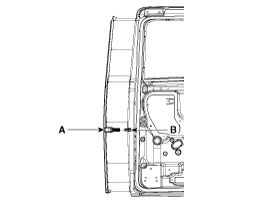
Disconnect the captive clip and remove the Anti-pinch strip(A) |
| 3. |
Remove the Anti-pinch strip connector(B).
|
| Installation |
| 1. |
Connect the anti-pinch strip connector. |
| 2. |
Install the anti-pinch strip connector. |
| 3. |
Connect the negative (-) battery terminal. |
 Power Sliding Door (PSD) Switch Repair procedures
Inspection
Overhead Console Door Switch Inspection
1.
When inspecting, use the inspection equipment to check for
input/output values of Overhead console door switch. If there''s any
malfunct ...
 Power Windows
...
Other Information:
Suspension Ball Joints Repair procedures
Inspection
Visually check to be sure that there are no flaws and cracks that may cause injury. ...
ESC operation
ESC ON condition
When the ignition is turned ON, ESC and ESC OFF indicator lights illuminate
for approximately 3 seconds, then ESC is turned on.
Press the ESC OFF button for at least half a ...
Categories
- Home
- First Generation
- Second Generation
- Third generation
- Kia Sedona YP 2014-2026 Owners Manual
- Kia Sedona YP 2014-2026 Service Manual

Copyright © www.kisedona.com 2016-2026